The Review Stew: Computer Products
The Review Stew Home Contact Me About Me Blogroll/awards PR Guidelines Advertise Disclosures
Showing posts with label Computer Products. Show all posts

Tuesday, April 21, 2015

Multi-Task with the NEW #AMDFX APU – HP Envy Touchsmart Laptop from @BestBuy

The reviewer has been compensated in the form of a Best Buy Gift Card and/or received the product/service at a reduced price or for free.

As a blogger and lover of movies and TV in my down time, a laptop that has extreme performance and a powerful mobile processor is a MUST! Every time I am on the market for a new laptop, I search and search for the right one that is going to last and is going to hold up against everything I throw at it (figuratively!).

Well, I think I have finally found it in the new AMD FX APU – HP Envy Touchsmart Laptop.


I MUST have a computer where I can multi-task because with three little children, a busy blog and not a lot of time on my hands, I ALWAYS and MUST multi-task to keep up with life! This computer can keep up with me with its HP Envy TouchSmart 15.6” touch screen.

And when I want to sit down and relax and watch a movie or my favorite TV show, the Quick AMD FX series processor is perfect for streaming movies or videos and provides great video quality so that I can enjoy my shows and finally relax at the end of a long day!


So if you are a busy mother, love gaming and entertainment, or just want a computer that can keep up with your busy life, then I recommend the AMD FX APU – HP Envy Touchsmart Laptop, exclusive at Best Buy. When you are looking for a notebook, the AMD FX Special Edition APU will provide you with unbelievable performance, gaming and productivity. Plus, with the new FX APU powered notebook, be unbeatable and experience the processing power of 10 compute cores (4 CPU + 6 GPU)**!

And since it is exclusive at Best Buy, you also get some additional great benefits like Free Shipping on orders $35 and up and Free Store Pickup! Plus, you pick up your order in as little as 45 minutes!

So don't sit and waste your precious time on a slow computer again! Get the AMD FX APU – HP Envy Touchsmart Laptop and enjoy the unbelievable PC performance and award winning graphics!


If you like what you just read please click to send a quick vote for me on Top Mommy Blogs- The best mommy blog directory featuring top mom bloggers

*The reviewer has been compensated in the form of a Best Buy Gift Card and/or received the product/service at a reduced price or for free.*

Thursday, April 9, 2015

Logitech Illuminated Living-Room Keyboard K830

A product was given for review for my honest opinion. No other compensation was given.

Looking for a gift this upcoming Father's Day for the TV and Computer lovin' Dad in your life? Then let me recommend the Logitech Illuminated Living-Room Keyboard K830.


For Dads who constantly stream content from the PC to the TV, the Logitech Illuminated Living-Room Keyboard K830 is a perfect gift for his man cave. It is designed to enhance the connected-TV experience; with it, Dad can wirelessly control his computer when it is connected to the TV, allowing him to access his favorite TV shows, music and movies, and even websites from the comfort of his couch.


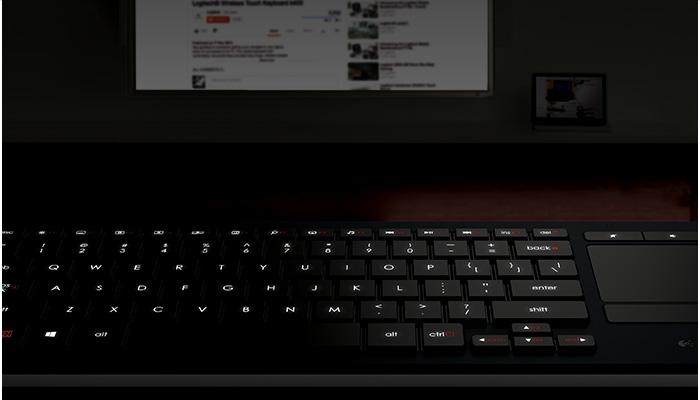
I absolutely LOVE how this keyboard allows me to see the keys well during the day AND during the night because of great backlighting! All you have to do is type and the keys illuminate. When you stop typing, the backlight turns off after 5 seconds and you save power!!


I also love how you don't need a mouse with this keyboard because the K830 streamlines navigation in the living room by combining a wireless keyboard and mouse into one device. You can control the mouse pointer precisely and accurately from a distance with the built-in multi-touch touchpad.

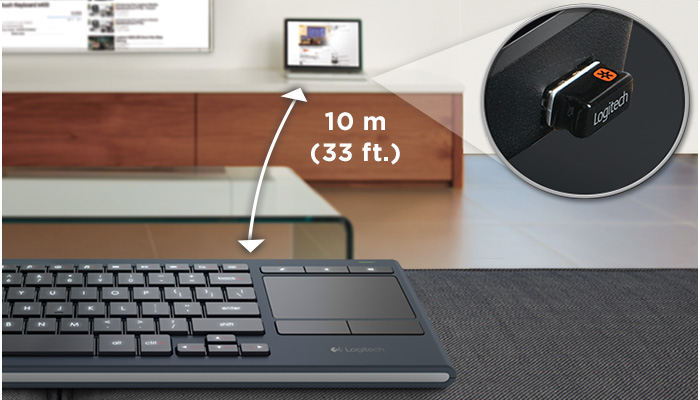
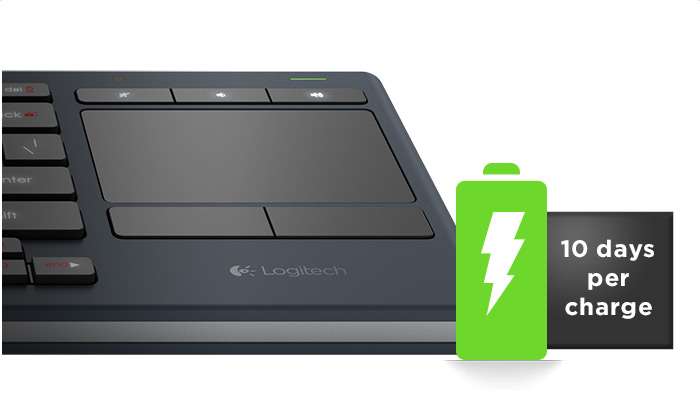
And I NEVER need cords or software with this keyboard! It has a 10 m (33 ft) Wireless range! Plus, it is rechargeable and you never need to change batteries! It charges easily with a micro-USB recharge cable.

It is the perfect size for any living room and the perfect gift for any tech guy this Father's Day!

Buy It: 

You can purchase the  Logitech Illuminated Living-Room Keyboard K830 for $99.99 from the Logitech website.

If you like what you just read please click to send a quick vote for me on Top Mommy Blogs- The best mommy blog directory featuring top mom bloggers

* Thank you to Logitech for their product for review! Disclosure - This product was given for review for my honest opinion. No other compensation was given.*

Monday, December 22, 2014

Logitech Bluetooth Multi-Device Keyboard K480 & Giveaway

A product was given for review for my honest opinion. No other compensation was given.


Technology is supposed to make our lives easier, right? Well, according to a recent survey by Logitech, 65 percent of Americans are distracted by messages from one of their devices when using another. Can you say device overload?!

I can definitely admit to being one of those device-overloaded individuals! I catch myself checking my phone, while typing on the computer. Sometimes, I even check emails at the same time on both my phone and computer! :)

And, 52 percent of U.S. parents have missed an important message because they could only use one device at a time. This news gets even more concerning when you learn that American parents estimate that 43 percent of their daily communication comes from their own family members!


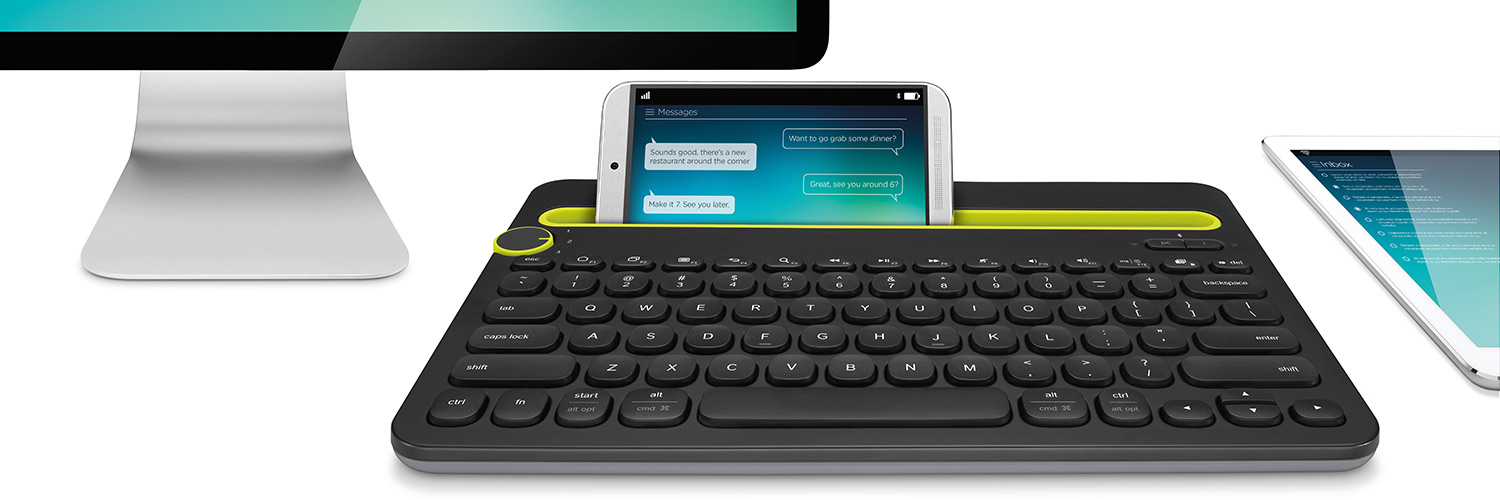
This onslaught of stimulation can be tough for anyone to handle, that’s why Logitech created the Logitech Bluetooth Multi-Device Keyboard K480, a wireless desktop keyboard that can work with up to three different Bluetooth devices – iOS or Android – at one time.

I get so many emails, texts and alerts coming at me at once almost all day long! I love that iwth this Logitech Keyboard, I can reply to it all from one keyboard!


I also love that I can switch easily between devices by just turning the the Easy-Switch dial. It quickly and easily switches typing between three connected Bluetooth wireless devices. Plus, the integrated cradle holds your phone or tablet at just the right angle for you to read while you type.

Every multi-tasker needs this Logitech Multi-Device Keyboard!

Buy It: 

You can purchase the Logitech Bluetooth Multi-Device Keyboard K480 for $49.99 from the Logitech website.

Win It:

Logitech is generously offering (1) Logitech Bluetooth Multi-Device Keyboard K480 to a lucky winner!

Enter here for a chance to win:
(1) Logitech Bluetooth Multi-Device Keyboard K480

a Rafflecopter giveaway


If you like what you just read please click to send a quick vote for me on Top Mommy Blogs- The best mommy blog directory featuring top mom bloggers

* Thank you to Logitech for their product for review! Disclosure - This product was given for review for my honest opinion. No other compensation was given.*

Thursday, September 4, 2014

D-Link's NEW Colorful Wi-Fi Routers

A product was given for review for my honest opinion. No other compensation was given.


If you are decorating your dorm room, your bedroom or your house this fall and don't want to mess up your color scheme with a boring old router but you NEED internet, then don't worry! I have the perfect solution!

D-Link has a new line of AC750 Wi-Fi Routers (DIR-818LW), available in red, teal, black and white, in light of the upcoming back-to-school season. Students already love the internet. Now they will love their router too!


Featuring a sleek, cylinder shape, the routers deliver next generation 802.11ac wireless speeds all while spicing up your living space. The new routers are perfect for any family looking for a reliable and strong network ideal for HD video streaming, online gaming and multiple user activities. In addition with the free mydlink Lite app, users can easily manage their network remotely and see what websites are being visited, block unwanted connections and set up automatic email alerts when unauthorized connections are made on any iPhone®, iPad® or Android™ device.


The AC750 Wi-Fi Router comes in four different colors and is powerful enough to let you surf the web, play games and stream HD movies - all at the same time! We received the Black unit (because my husband is extremely BORING!) but I LOVE the Teal and Red colors for brightening up any room! No one will know that it is your router with these fun colors! Plus, you will love it as you surf the internet, do homework, or play games!

Buy It: You can purchase the AC750 Wi-Fi Router in all four colors for $79.99 from Amazon.com


If you like what you just read please click to send a quick vote for me on Top Mommy Blogs- The best mommy blog directory featuring top mom bloggers
* Thank you to Salba Chia for their product for review! Disclosure - This product was given for review for my honest opinion. No other compensation was given.*

Tuesday, November 5, 2013

Seagate Slim

A product was given for review for my honest opinion. No other compensation was given.


If you have a lot of digital content (videos, pictures, music, documents) and need a lightweight solution that you can slip in your backpack, then check out Seagate's Slim and rely on it to keep your work secure and organized!


Seagate Slim is great gift idea for the gadget lover in your life. Seagate Slim's top features include:
  • stores 15X more music, movies and other digital content
  • maintains the sleek portable size peopl e look for while they are on the go (drive is only slightly larger than an iPhone and just 9mm thick!)
  • has a “save” feature that automatically backs up pictures posted to Facebook or Flickr
The Seagate Slim portable drive is a thin and light way to back up the things that are important to you on Windows® computers.
  • Protect your stuff with easy, flexible backups
  • Automatically save photos from your social networks
  • Share photos and videos to social networks with a click


Wallets are bigger than this!

Now available in a black or silver anodized metal finish, the Seagate Slim portable drive is more than just the slimmest portable hard drive available. Inside its sleek design is simple, intuitive software that makes it a snap to back up what’s important to you.

How slim is Slim? This amazing drive is lightweight and about as thin as a pencil, so it fits—and goes—anywhere.


Other features:
  • Works with PC or Mac®: Use it interchangeably on your PC or Mac® computer without reformatting.
  • Protect …Photos, videos and more on-the-go: Life is full of amazing moments you want to remember forever. The Seagate Slim portable drive goes where you go, providing easy, plug-and-play backups. So no matter where ‘life happens,’ your memories are always protected.
  • Save …Your social life with a click: Think of how many photos you’ve shared on Facebook® or Flickr®. With our built-in backup software and dashboard control, you can easily download them right to your drive, so even more of your life is safe and sound.
  • Share ...Your favorite moments instantly: You can also easily share photos and videos to Facebook®, Flickr® and YouTube®—simultaneously—right from your Seagate Slim drive. Smart integration with popular social media means your memories aren’t “trapped” in your drive, letting you publish them to the social network of your choice.

Buy It: You can purchase Seagate Slim for $69.99 from Seagate.com, Walmart, Best Buy, Staples and others

If you like what you just read please click to send a quick vote for me on Top Mommy Blogs- The best mommy blog directory featuring top mom bloggers

* Thank you to Seagate for their product for review! Disclosure - This product was given for review for my honest opinion. No other compensation was given.*

Thursday, October 17, 2013

Leap Motion Controller

A product was given for review for my honest opinion. No other compensation was given.


Are you ready to learn about one of the coolest new computer gadgets out there???

Then let me introduce to you  the Leap Motion Controller, the new 3-D motion-control technology that opens new doors to interactive learning by letting users control computers with natural hand and finger movements. It is great for home use, the workplace, even schools! Teachers around the world have purchased Leap Motion Controllers for their classrooms!


This Leap Motion Controller is like magic!!! It goes where no device has gone before.With a wave of a hand or lift of a finger, you can use your computer in a whole new way. The Leap Motion Controller senses how you move your hands the way you naturally move them. So you can point, wave, reach, and grab. Even pick something up and put it down. Just like in real life. It’s an amazing device for the things you do every day and for things you never thought you could do.


I can definitely admit that after spending all day typing, clicking and using my computer all day, my fingers arms, and elbows get really sore. I have even started to get tendinitis in my fingers and wrists from computer use! The Leap Motion Controller can definitely help me get some relief!

  • Browse the web, read articles, flip through photos, and play music just by lifting a finger.
  • Draw, paint, and design with your fingertip. You can even use a real pencil or paintbrush.
  • Slice falling fruit and shoot bad guys with your finger. Steer cars and fly planes with your hands.
  • Sculpt, mold, stretch, bend, and build 3D objects. Take things apart and put them back together.
  • Reach into the universe, grab the stars, and soar around the sun. It’s a whole new way to learn.
  • Pick, pluck, strum, and drum. Play air guitar, air harp, air everything. For real
You can do everything you normally do on your computer: play games, browse Facebook and Pinterest, listen to music, search on Google. Isn't that amazing???!!


The Leap Motion Controller doesn’t replace your keyboard, mouse, stylus, or trackpad. It works with them, and without special adapters. With the Leap Motion software running, just plug it into the USB on your Mac or PC, and you’re off.

Leap Motion also comes with Airspace, an app store with access to educational apps for all ages across a variety of subjects. Here are a few examples:

Early Education

· Curious Kids – Explore animal sounds, practice counting and even play the piano

· TVOKids Caterpillar Count - Help your child learn to count with by guiding a caterpillar around the screen with their finger to collect numbers in sequential order

Geography

· Google Earth- Soar above the cities, mountains, rainforests, and oceans on Earth, or discover new sights on the moon and Mars

· Nokia’s Here.com - Fly above 25 world cities – from Barcelona to Vienna – with a tiny paper airplane

Science

· Cyber Science – Learn how the human body works, pull apart and put back together portions of the body

· Frog Dissection – Examine 3-D models of organs (no formaldehyde required!) and experience the lifecycle of a frog

· Power of Minus Ten – Learn about the structures of key cells, proteins and molecules of the human hand

Music

· AirBeats - Capture your natural air drumming movements and play in a variety of styles, with different kits and patterns

· AirHarp - Reach out to pluck and strum a virtual harp, with quick access to a variety of musical scales

· FingerTapps Piano - Tap out classic compositions on a virtual grand piano or electric organ, with play-along instructions to guide you through ea ch song


So, if you want the latest technology for computers, pick up the Leap Motion controller today! It is great for the home, work place, and school!

Buy It: You can purchase the Leap Motion Controller for $79.99 and can be purchased at any U.S. Best Buy store or online at https://store.leapmotion.com.

If you like what you just read please click to send a quick vote for me on Top Mommy Blogs- The best mommy blog directory featuring top mom bloggers

* Disclosure - This product was given for review for my honest opinion. No other compensation was given.*

Thursday, October 10, 2013

Epson Expression Premium XP-810 Small-in-One Printer

A product was given for review for my honest opinion. No other compensation was given.


What family isn't busy these days, right??? 

Between sports, work, and other extra-curriculars, parents and families are running and running without much spare time. So how does everyone keep connected these days?? Everyone knows the answer is through technology, specifically smartphones, tablets and computers!

So what has Epson done to keep up with the latest busy family trends? They came out with the new Expression® Premium XP-810 Small-in-One™ printer which is designed for today’s busy families and photo enthusiasts. This model leverages Epson MicroPiezo® printing technology and Claria® Premium inks to produce consumer-rated unbeatable quality prints with an ultra-slim design and ultra-powerful performance. It also includes Wi-Fi CERTIFIED™, Wi-Fi Direct™, and Epson Connect™ for easy wireless printing from a tablet, smartphone or computer from literally anywhere in the world.


The Expression XP-810 adds a 30-page Auto Document Feeder for automatic two-sided copying, scanning and faxing, a 3.5-inch touchscreen with gesture navigation for easy setup and operation, specialty paper support through its rear paper feed, and an auto-extend paper output tray.

My favorite part about this Epson Printer is that it makes it easier than ever for busy parents and families to print from the home or anywhere in the world with the Epson Connect which makes it easily set up for printing away from home and from anywhere in the world!


Additional Expression Premium XP-810 Small-in-One Printer Features:
  • One-sided ISO print speeds of 14.0 ISO ppm (black)† and 11.0 ISO ppm (color)†
  • Save up to 50% on paper with the option of automatic two-sided printing.
  • Wirelessly print documents, photos, calendars, contacts and more; charge your cell phone or MP3 Player using the USB port.
  • Share one printer with multiple computers in your home or office, using a wireless or wired network.
  • Quickly print or copy documents and photos — get sharp text and vivid, true-to-life color.
  • Easily copy, scan and fax stacks of documents with the built-in automatic document feeder.
Buy It: You can purchase the Epson Expression XP-810 for $229.99 from major retailer stores nationwide.


If you like what you just read please click to send a quick vote for me on Top Mommy Blogs- The best mommy blog directory featuring top mom bloggers

* Thank you to Epson for their product for review! Disclosure - This product was given for review for my honest opinion. No other compensation was given.*

Tuesday, June 25, 2013

Logitech’s Eye Candy Color Collection

A product was given for review for my honest opinion. No other compensation was given.


Have a high school grad who is headed off to college this fall? I have the perfect going away present: the Logitech Wireless Mouse M325 and Logitech Zone Touch Mouse T400 from their Eye Candy Color Collection!

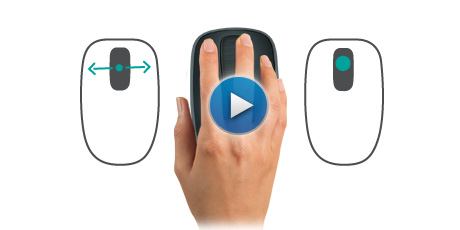
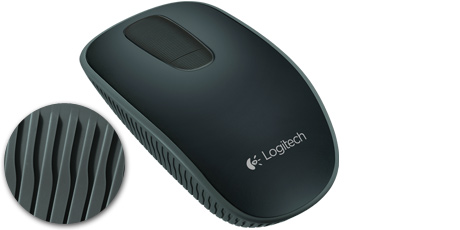
They will study in style and will turn their desk from drab to fab! Logitech’s Eye Candy Color Collection – its fifth-annual design collection – brings intense bursts of bright colors and luscious, eye-catching patterns to some of its most popular mice. The Logitech Eye Candy Color Collection reflects your grad’s spark and enthusiasm, and is an affordable treat for his or her desk. The designs bedeck the micro-precise scrolling Logitech Wireless Mouse M325 and Logitech Zone Touch Mouse T400, a comfortable hybrid mouse that has both traditional mouse buttons and supports Windows 8 navigation with a touch zone.


Technology has never been so sweet with these colorful mice bursting with bright candy hues and luscious patterns designed for Millennials. A feast for your eyes, each unique design is like a cherry on top to your personal sense of style. With this bright, colorful collection, suddenly everyone’s like a kid in a candy store—reaching for a piece of instant gratification. 

Additional features include: 

Glass touch zone for smooth scrolling: Essential Windows 8 navigation comes alive with horizontal and vertical scrolling with the simple, intuitive motions of your finger.


Handles great, feels even better: You’ll find the shape to be familiar, and we’ve added rubber to the sides for better comfort and handling.


Quick access to Windows 8 Start screen: Easily access your favorite apps on the Windows 8 Start screen with a simple dedicated action.

18-month battery life: With up to 18 months of battery life*, it’s so hassle free you might forget it runs on batteries. But just in case, we’ve added a battery status indicator to make sure you’re never caught without power.

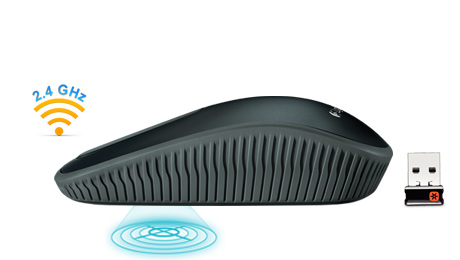
Logitech Advanced Technology: Plug it. Forget it. Add to it. Unifying receiver connects up to six compatible devices.

Advanced 2.4 GHz wireless: Say good-bye to cords and enjoy wireless freedom.

Logitech Advanced Optical Tracking: Enjoy precise point and click actions.

Customizable Controls: Personalize with optional Logitech SetPoint™ software.

Buy It: You can purchase the Logitech Zone Touch Mouse T400 for $49.99 from the Logitech website. 

If you love this review and my site...
Visit Top Mommy Blogs To Vote For Me

* Thank you to Logitech  for their product for review! Disclosure - This product was given for review for my honest opinion. No other compensation was given.*

Tuesday, June 18, 2013

Wireless Range Extender

A product was given for review for my honest opinion. No other compensation was given.


Ever since I moved into my in-law's house, when I am trying to work on the computer in my bed, the internet is constantly cutting out and is REALLY SLOW! It absolutely drives me crazy and makes my work take twice as long! That is why I am so glad I received the Wireless Range Extender (WR300NSI) from Diamond Multimedia!

Now I don't have to stress over and get super frustrated about not receiving lightening-fast internet speed! The WR300NSI--the second generation of the best-selling wireless extender from Diamond Multimedia, extends the wireless range, creates a wireless hotspot and connects to internet ready devices such as Blu Ray Players or gaming consoles.
The 3-in1 device will help users eliminate wireless dead-spots anywhere they go, targeting a frustrating and common household issue. Eliminate the hassle of complicated extenders and software because there’s no need for plugging in the extender into your computer or setting it up with a cd -- after plugging it into the wall, opening the browser automatically takes you to the setup page. Don’t worry about anyone stealing your stellar connection as WR300NSI also extends the same security as a personal router. For more information, please watch the video here.


3 in 1 device

1. Wireless Repeater and Range Extender: Receives weak wireless signals and extends the signal range to greater distances eliminating wireless dead spots.

2: Standalone Wireless Access Point: Create a wireless network by connecting the device to a wired router/cable modem or DSL modem. This small compact portable device can create wireless connectivity where ever you go. Use in your hotel room and turn a wired internet connection into a wireless internet connection.

3. Wireless Bridge Device: Receives wireless signal from your home wireless network and convert to wired Ethernet connections for non wireless devices such as internet ready HDTV, Blue-Ray players, gaming consoles, and media players. WR300NSI is designed with RSSI indicators to determine the strength of wireless signal received from router to it. This helps users to place WR300NSI in the best possible location to repeat existing wireless signal.


So, if there are a couple rooms in your house that don't receive the wireless signal as well as the rooms closer to the wireless router, then get this Wireless Range Extender (WR300NSI) from Diamond Multimedia to eliminate frustrations! It is easy to use, has a secure network, and can even turn wired internet into wireless!

Buy It: You can purchase the Wireless Range Extender (WR300NSI) for $49.99 from Diamond Multimedia's website. 

If you love this review and my site...
Visit Top Mommy Blogs To Vote For Me

* Thank you to Diamond Multimedia for their product for review! Disclosure - This product was given for review for my honest opinion. No other compensation was given.*

Friday, June 7, 2013

Crucial Memory & Storage Upgrades

A product was given for review for my honest opinion. No other compensation was given.


Do you have a tech-savvy Dad that is so hard to buy for? Then don't fret anymore about Father's Day because Crucial, a leading provider of memory and storage upgrades, offers great options for the tech-savvy dad!

The Crucial brand reflects status as the only consumer memory upgrade supplier that's part of a major DRAM manufacturer. They sell high-quality memory that has been qualified and approved by most major original equipment manufacturers (OEMs). The Crucial.com website features innovative online tools and an intuitive design that makes it easy to find compatible memory and recommended upgrades. And because they carry over 250,000 upgrades for more than 40,000 systems, they've got options for nearly every system out there.


See below for a selection of must-have gear any dad will love:

Crucial M500 SSD: Available in capacities up to terabyte-class, the Crucial M500 SSD provides plenty of storage for your ever-growing collection of photos, videos, music, and important documents. Based on your storage needs, the M500 SSD is available in capacities ranging from a 120GB, 240GB, 480GB, or 960GB with MSRPs from $129.99 to $599.99.

Crucial DDR3 Ballistix Sport: The Crucial Ballistix Sport DRAM module is the perfect gift for mainstream computer users and gaming enthusiasts looking for fast, reliable memory upgrades that will help their computers run programs and applications faster. An affordable solution for improving computer performance, Crucial Ballistix Sport DRAM modules are available in a variety of densities and are easy to install. (Available in capacities ranging from 2GB to 32GB with MSRPs from $24.99 to $287.99)


Crucial DDR3 Ballistix Elite: Designed for extreme enthusiasts, demanding gamers, and overclockers who want to squeeze every ounce of performance out of their systems, Crucial Ballistix Elite memory modules are designed to dominate. With some of the fastest speeds and timings available, it's tough to lose when you're equipped with Ballistix Elite memory. (Available in capacities ranging from 2GB to 16GB with MSRPs from $25.99 to $171.99)

Buy It: You can purchase all Crucial products from the Crucial website. 


If you love this review and my site...
Visit Top Mommy Blogs To Vote For Me

* Thank you to Crucial for their product for review! Disclosure - This product was given for review for my honest opinion. No other compensation was given.*

Tuesday, April 30, 2013

Office 365 Home Premium & Giveaway


With Spring finally here (although sadly it is supposed to snow here again this week), you may have started your spring cleaning in your house, yard, etc. But have you thought about spring cleaning your computer???

If not, you really should think about taking care of your computer and using the NEW Office 365 Home Premium. It is a great resource to help people “spring clean” their technology.

A Few Ways Office 365 Can Help Spring Clean Your “Digital Home”:

· Organize from anywhere. It’s time to organize the plethora of images you have sitting on your desktop. Share large videos, photos and more through SkyDrive’s free cloud storage solution. You can even access these files on your Windows Phone.

· Ask everyone to pitch in: Assign family chores for the week with the chore schedule template in Excel 2013. Lists the tasks to be done, assign a name to them, and check them off when finished. You can even save it to the cloud with SkyDrive so that your family can update it in real-time.

· Take notes that save to the cloud. The new offerings from OneNote allow you to take your notes anywhere (on your phone, tablet or laptop) – whether you’re at an event, gathering with family or friends, or need to meet a deadline in between your kids’ busy schedules.

· Track your to-dos. The to do list template in Excel 2013 allows busy families to keep track of important tasks – without cluttering up your refrigerator with sticky notes!

· Upload your spring planning notebook into the cloud. By saving your family’s sports and activities schedule to SkyDrive, you can access it from any computer using the OneNote Web App. You can also update on-the-go since OneNote is also available on pretty much every mobile device.

· Never miss an assignment. Kids can use the schedule template in Excel 2013 to organize and keep track of homework assignments in various classes. Click New Week and Excel will automatically create a new schedule tab ready for input!

· Keep your calendars in check. With Outlook, you can color code each of your family members’ activities, share it with your spouse, and in general keep the whole family better organized.


What it Includes:

· The latest and most complete set of Office applications: Word, Excel, PowerPoint, OneNote, Outlook, Publisher and Access

· One license for the entire household to use Office on up to five devices, including Windows tablets, PCs or Macs, and get Office on Demand from any Internet-connected PC

· An additional 20 GB of SkyDrive cloud storage, nearly three times the amount available with a free SkyDrive account

· 60 free Skype world calling minutes per month to call mobile phones, landlines or PCs around the world

· Future upgrades, so you always use the latest time-saving technology

· Automatic save to SkyDrive, so your documents — and even your personal settings — are always available from virtually anywhere and on your favorite devices

It is so unique because it gives people the flexibility to do things how and when they want – whether you're at home, at a coffee shop, waiting to pick up your kids at school, or anywhere in between. It’s subscription-based, which means you can use one license for an entire household on up to five devices – plus all your documents are saved automatically to SkyDrive (on the cloud), for easy access to your documents and personal settings from anywhere!

Buy It: You can purchase Office 365 Home Premium for $99.99 for an annual subscription (Office 365 Home Premium costs the equivalent of US$8.34 per month) from the Microsoft Office website.

Win It: Microsoft Office is generously offering (1) 1 year subscription to Office 365 Home Premium (a $99.99 value) to a lucky winner!

Enter here for a chance to win:
(1) 1 Year Subscription to Office 365 Home Premium 
(a $99.99 value)
a Rafflecopter giveaway


If you love this review and my site...
Visit Top Mommy Blogs To Vote For Me

* Thank you to Microsoft Office for their product for review! Disclosure - This product was given for review for my honest opinion. No other compensation was given.*